Best Shortcuts in CircuitMaker by Altium
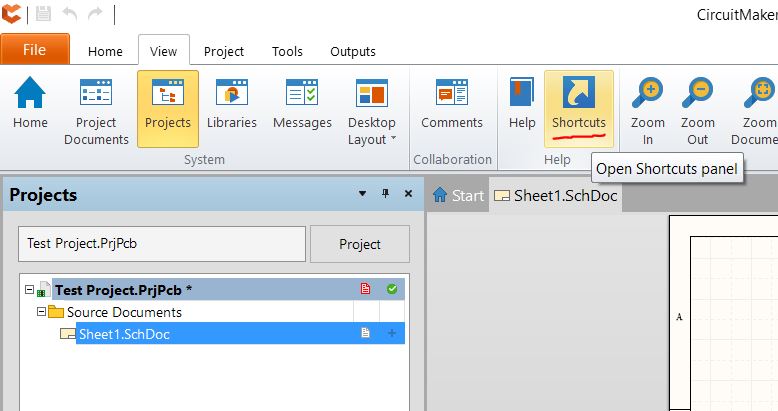
Here’s a list of the most useful shortcuts in CM - more graphical and intuitive than the built in shortcut list (Ribbon Bar->View->Shortcuts). Above - Shortcut List Location Pro Tip: When the tools aren’t working correctly, press ESC a few times. Schematic Shortcuts Crtl+Scroll Zoom Center Button - Click Hold and Drag Zoom Pg Up/Down Zoom (Great for laptops) Right Button - Click Hold Drag Pan Ctrl+A Select A ll Crtl+C C opy Ctrl+X Cut Ctrl+V Paste Ctrl+D D uplicate W W ire (for opening wiring tool) Space Change Wiring Path - Only works when wiring Shift+Space Change Wiring Angles - Only works when wiring Space Rotate Selected Object Tab or Double Click Edit Properties of selected object G Toggle G rid Size (look in bottom left-hand corner) Z Add Ground V Add V CC (press TAB to quickly change net name) T T ext (press TAB to change text) N N et Label (press TAB to change text) C Place C omponent X Flip left/right (X -Axis) Y Flip up/down (Y -Axis) Esc E xit Tool Ctrl+Tab Go to Next Tab Ctrl+Shift+Tab Go to Previous Tab PCB Shortcuts Crtl+Scroll Zoom Center Button - Click Hold and Drag Zoom Pg Up/Down Zoom (Great for laptops) Shift+Pg Up/Down Precise Zoom (Great for laptops) Right Button - Click Hold Drag Pan Esc Exit Tool (so very useful) Ctrl+A Select All Crtl+C Copy Ctrl+X Cut Ctrl+V Paste R Route Trace Space Change Routing Path - Only works when routing Shift+Space Change Routing Angles - Only works when routing Space Rotate Selected Object G Toggle Grid Size (look in bottom left-hand corner) Shift+S Single Layer View (Toggle visibility of all layers except for the active layer) Backspace Undo Trace Segements of selected trace Tab or Double Click Edit Properties of selected object Have a favorite not listed? Leave it in the comments below. ...